
Microscope Camera Software — CM5 Linux Stack
Skills/Software/Platforms: Python · Flask · picamera2 · Linux · Raspberry Pi CM5
What this is
A web-based camera controller for a custom microscope built around a Raspberry Pi CM5.
Partly this is an excuse to use the new Pi 5 compute modules, which I haven’t had a chance to use for a proejct yet. But also I needed a camera for my microscope and I didn’t like how a lot of the offerings currently either have a USB connection and then you install an app, HDMI output, or a screen built in so I figured I’d make something myself.
I essentially wanted a mini computer with loads of options and features that could be small enough to fit ontop of my trinocular camera, and enable me to webhost a stream, serve the files to my local network, and anything else that I could think of. Power it on, open a browser on any device on the same network, and everything is there. I also wanted a camera stack that is well developed for the Pi and will integrate nicely and I don’t have to worry about driver issues. The HQ camera offering from Raspberry Pi is nice for this, even if there are some limitations (I’ll get to those).
Thus - Pi 5 compute!!
The software is written to go with the carrier board I made which interfaces to an e-ink screen to show some simple information about the system.
I’m looking to extend the next revision to be battery powered but I’m currently of two minds about that - the LEDs on my ringlight will draw a reasonable amount of power over time, and honestly I’m tired of everything being battery powered and then the batteries die in a year or so. I’m going to leave that option open and see how I get on with a plugged in version.
Eventually I want to try and open-source this and potentially offer it as a kit for people to get set up themselves, as I found it odd that somebody else hadn’t already implemented this project! I’ll see how much time I’ve got and whether I feel comfortable with that…
System architecture
  Browser (any device on network)
          │
          │  HTTP / MJPEG
          ▼
  ┌──────────────────────────────────┐
  │   gunicorn (1 worker, 8 threads) │
  │         ├── Flask app            │
  │         │     ├── /stream        │─── MJPEG generator
  │         │     ├── /capture       │─── Still to disk
  │         │     ├── /api/*         │─── Camera controls
  │         │     └── /config        │─── GPIO / settings
  │         └── Background threads   │
  │               ├── USB monitor    │─── /proc/mounts poll
  │               └── GPIO listener  │─── gpiozero events
  └──────────────────────────────────┘
          │
  ┌───────┴──────────────────────────┐
  │         picamera2                │
  │   main stream  │  lores stream   │
  │  (full res)    │  (MJPEG 720p)   │
  └───────┬────────┴─────────────────┘
          │  MIPI CSI-2
          ▼
      Camera module
       (BCM2712 ISP)
Video streaming — picamera2 and the BCM2712 ISP
picamera2 is the current libcamera-based Python interface for Raspberry Pi cameras. Under the hood it talks to the kernel via libcamera and V4L2; the application sees a clean Python API while the BCM2712’s on-chip ISP does the heavy work.
The application runs two picamera2 streams simultaneously:
Main stream — full sensor resolution (up to 2304×1296). Used only for still capture, so it sits idle most of the time. Captured as JPEG to local disk under captures/YYYY-MM-DD/.
Lores stream — lower resolution MJPEG, used for the live browser view. Running both from the same Picamera2 instance is a first-class feature of the library; the ISP handles both outputs in a single pipeline pass without duplicating sensor reads.
The MJPEG stream is served as multipart/x-mixed-replace — a persistent HTTP connection where each frame is a new JPEG boundary. This is intentionally simple: it works in every browser, requires no WebSocket or WebRTC infrastructure, and means the stream degrades gracefully on a slow WiFi link rather than buffering. The user can switch resolution from the UI; lower resolutions reduce latency over congested networks at the cost of detail.
Hardware acceleration is the key reason the CM5 handles this without stress. Running a software decoder stack on the same CPU that’s serving web requests and monitoring USB mounts would saturate a low-power processor. The BCM2712 ISP offloads the imaging pipeline entirely — the CPU sees pre-processed frames, not raw Bayer data.
Web interface
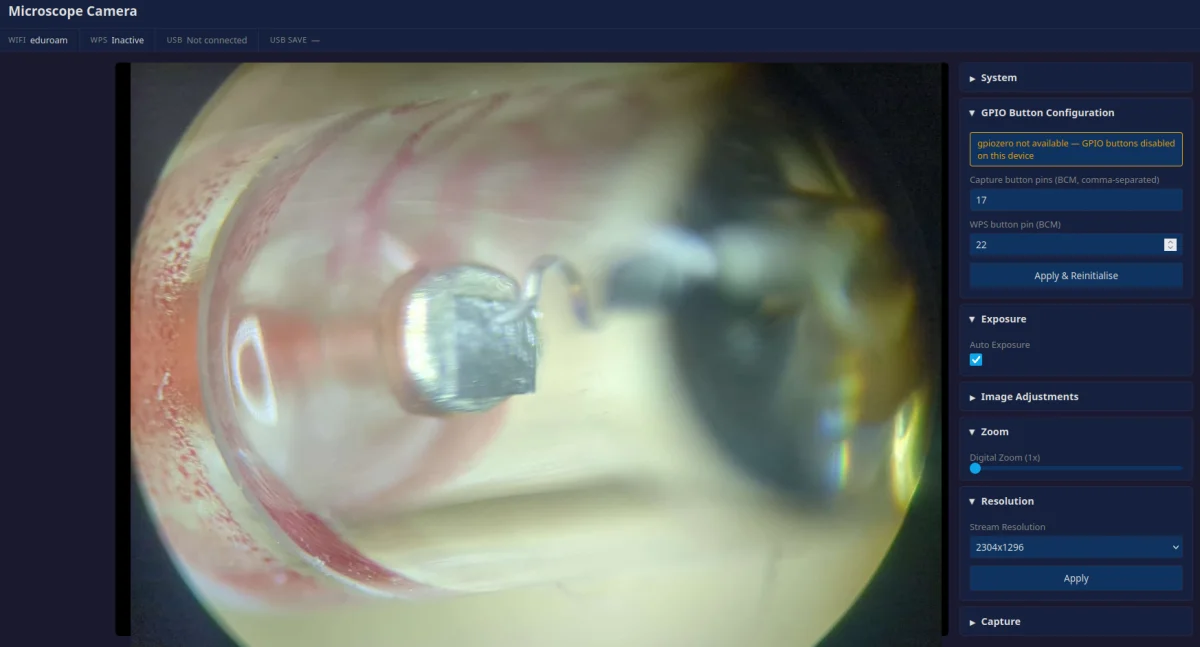
The frontend is intentionally minimal: Flask templates, vanilla JavaScript, no build toolchain. Dark theme from the start — microscope work is often done in a dim room and a bright white UI is uncomfortable. The status bar across the top shows camera model, current resolution, WiFi SSID, and USB drive state at a glance.
Camera controls (exposure, white balance, focus position, gain, zoom) are exposed as range sliders and dropdowns. Each control maps directly to a picamera2 parameter. Resolution switching resets the lores stream without restarting the application. All adjustable settings are persisted to a JSON file so they survive a power cycle.
The gunicorn choice matters here: the Flask development server is single-threaded. An MJPEG stream is a persistent connection that holds a thread open for its entire duration — the dev server would block entirely on the stream and drop all other requests. gunicorn with one worker and eight threads handles the stream, simultaneous API calls, and status polling correctly.
Camera Limitations
While the Pi HQ camera is nice for this application, it has some limitations. It can take PICTURES in 4k resolution, but it can’t stream the video in 4k. The IMX477 IC that the Pi camera uses can handle 4k video stream in theory but the CSI interface on the Pi only has a two-lane dataline as opposed to the standard four-data lane which means the data stream is only up to 1Gbps. There are a few resources online that talk about changing these settings but it’s not officially supported by the Pi drivers just yet. I’m going to leave this as an option to me in the carrier board with some breakouts of the CSI pins, and see if I can hack something together in the software to get me a 4k video stream.
Linux system integration
Systemd service
The application runs as a systemd service. A few decisions here that I feel are worth being explicit about:
video for camera access via V4L2, gpio for the button pins via gpiozero, netdev for WiFi management via nmcli. This is the right way to do it. Running as root to sidestep group permissions is common on Pi projects and consistently the wrong call — it turns a misbehaving application into a system-level problem.
The service is set to restart on failure. If the camera driver glitches, the application crashes, or the lores stream stalls, the service recovers without intervention:
Restart=on-failure
RestartSec=3
Systemd dependency ordering puts the service after network.target so it doesn’t race against NetworkManager on boot.
USB storage auto-detection
Captured images are automatically mirrored to any connected USB drive. The monitor thread polls /proc/mounts every two seconds looking for entries on /dev/sd*. When a new device appears it checks writability, then copies any images captured since it was connected.
I deliberately avoided udev rules for this. udev is the right tool for triggering one-shot actions on device attach, but a persistent poll is simpler to reason about and easier to debug on a prototype board where things are still changing. /proc/mounts is always up to date and requires no D-Bus, no udev configuration, no special permissions.
The status bar shows whether a drive is connected and whether it’s writable. This distinction matters — a read-only mount (FAT32 requiring repair, permissions mismatch) silently failing to mirror captures would be worse than no mount at all.
GPIO — gpiozero
Two physical buttons on the carrier board, wired active-low with pull-ups to GPIO 17 and GPIO 22:
- No software debouncing required for me! schmitt trigger on the switch inputs.
- Event-driven model (
button.when_pressed) that doesn’t require a polling loop - Works with the standard BCM2712 GPIO driver with no extra kernel modules
GPIO pin numbers are configurable from the web UI and persisted to the settings file. This turned out to be useful during early testing on a bare CM5 before the carrier PCB existed — I could patch to whatever GPIO was convenient.
WiFi and WPS
The carrier PCB routes the CM5’s onboard wireless to an SMA antenna connector. I haven’t done any testing yet to see about Wi-Fi range but I wanted to have that flexibility to include an external antennae if I needed it.
What I didn’t want, is having to plug in the device and tell it what Wi-Fi network to connect to, so a WPS button was added to the carrier board that supports both nmcli and iwgetid. I wasn’t sure whether I’d be using Pi OS Lite or Pi OS Desktop as they use different network stacks. This should (in theory) work on both. Yet to check this!
WPS lets a user join the device to a new network by pressing a button — no keyboard, no access point, no configuration file.
Skills demonstrated
- Linux systems — systemd unit design, service hardening with supplementary groups, boot ordering, failure recovery,
/procfilesystem for hardware polling - Video streaming — picamera2 dual-stream configuration, MJPEG over HTTP, hardware ISP utilisation, runtime resolution switching
- Platform selection — CM5 vs full SBC trade-offs, BCM2712 hardware ISP, driver ecosystem maturity, Compute Module form factor advantages
- Production Python — gunicorn multi-threaded deployment, Flask application structure, thread-safe background monitors
- Hardware integration — V4L2/libcamera driver stack, nmcli/wpa_supplicant WiFi management